Okasha
Sammer
How a Cleaning Business Dropped Their Cost Per Lead from $240 to $43 Without Changing Their Ad Spend
A cleaning business in the USA was spending $1,200 per month on Meta ads, generating four to six leads per month — roughly $240 per lead. Six weeks later, same budget, same ad creative, same targeting: $43 per lead and 28 leads in a month. Nothing about the ad changed. What changed was the page the ad sent people to.
This post is the full breakdown of that audit — what we found, what we fixed, in what order, and the exact numbers before and after. If you are running ads and your cost per lead feels too high, this is most likely why.
Why Is My Cost Per Lead So High on Meta Ads?
High cost per lead on Meta ads for home service businesses is rarely caused by the ad itself. In the vast majority of audits, the cause is the landing page — specifically, ads sending traffic to a homepage or general page instead of a dedicated, message-matched landing page.
Fix the destination before touching the ad.
advertising. Business owners see a high cost per lead and immediately think: the ad is the problem. New creative. New copy. New audience. Sometimes a new agency.
But the ad’s only job is to get the click. Once the click happens, the ad is done. Everything that determines whether that click becomes a lead happens on the page the click lands on.
The Starting Point: What the Business Was Doing
The business: a residential cleaning company operating in a mid-sized US city. Established, good reviews, real demand for their service. Their Meta ads had been running for about four months when I was brought in to audit the account.
$240
4-6
$1,200 per month on Meta ads, running consistently for four months. The ad creative was a short video of a clean kitchen with text overlay: “Spend Your Weekend Relaxing, Not Cleaning.” Targeting was reasonable — local radius, homeowners, relevant interest categories.
Their ad manager had already tried three different versions of the ad creative over those four months. Each version performed roughly the same. Click-through rate was actually decent — around 1.8%, which is above average for this type of campaign. People were clicking.
The problem was what happened after the click.
The Audit: What I Found in 40 Minutes
I started where every audit starts — by clicking the ad myself, on mobile, exactly as a potential customer would.
Where the ad sent traffic
The ad linked to the business homepage. Not a landing page. The homepage.
The homepage had seven navigation links across the top: Home, About, Services, Pricing, Gallery, Blog, Contact. Below that, a hero section with a stock photo of a smiling cleaner, a generic headline (“Professional Cleaning Services You Can Trust”), and three competing buttons: “Get a Quote,” “View Services,” and “Call Now.”
Using session recordings, the average visitor who arrived from the Meta ad spent eleven seconds on the homepage before leaving. Most did not scroll past the hero section. None of them clicked through to a contact action in the recordings I reviewed
The disconnect between ad and page
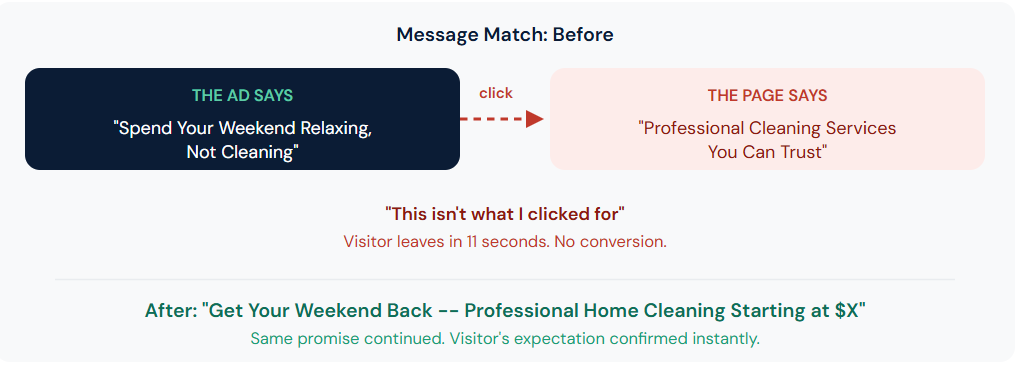
The ad promised: spend your weekend relaxing instead of cleaning. A specific, emotional, time-saving promise.
The page said: “Professional Cleaning Services You Can Trust.” A generic, company-focused statement that did not connect to what the visitor just saw in the ad thirty seconds earlier.
This is called a message match failure. The visitor clicked because of one promise and arrived to a completely different message. That gap creates an instant, often subconscious feeling of “this isn’t what I clicked for” — and the visitor leaves.
The Diagnosis: Five Specific Problems
Seven navigation links gave visitors seven ways to leave the page instead of one way to take action.
Three competing CTAs (“Get a Quote,” “View Services,” “Call Now”) split attention and signaled indecision rather than confidence.
No trust signals visible without scrolling — no reviews, no specific numbers, no proof of past work.
Phone number in the footer only — invisible without scrolling to the bottom of the page.
No urgency or specific offer — “Get a Quote” requires the visitor to take an extra step before getting any value.
The Fix: What We Built
| Change | Purpose |
|---|---|
| Dedicated Landing Page | Focus visitors on a single conversion goal |
| Headline Matched the Ad Promise | Reinforce expectations and improve message consistency |
| Trust Signals Above the Fold | Build credibility and reduce hesitation |
| Single CTA Button | Simplify decision-making and increase action rates |
| Sticky Phone Number & CTA | Keep contact options visible throughout the page |
| FAQ Section with Schema Markup | Address common objections and improve search visibility |
| Everything Else Stayed the Same | The only change was the landing page experience |
What Is a Good Cost Per Lead for Home Service Businesses?
This case study is not unusual. It is the norm.
In 30+ home service website audits, the large majority of businesses running paid ads were sending that traffic to a homepage or general services page — not a dedicated landing page built for that specific campaign. The cost-per-lead numbers varied, but the underlying issue was almost always the same: a strong ad, a weak destination.
The questions that reveal this problem in your own account
- Where does your ad actually send traffic — a dedicated page, or your homepage?
- Does the headline on that page say the same thing your ad promised, or something different?
- How many links can a visitor click on that page besides the one you want them to click?
- Is there a specific number, review, or proof element visible without scrolling?
- Is your phone number visible the entire time someone is on the page, especially on mobile?
If the answer to any of these reveals a gap, that gap is very likely costing you the same multiple this business was paying — roughly five times more per lead than necessary.
Frequently Asked Questions
Why is my cost per lead so high on Meta ads?
How long does it take to see results after fixing a landing page?
Should I pause my ads while I fix my landing page?
Does this approach work for services other than cleaning?
What should I fix first if I have multiple landing page problems?

okasha
Table of Contents
Your First Lead Starts Here
If your site isn’t bringing in leads, it’s not working hard enough.
Let’s fix that.
Book a consultation today and discover how I can help you generate 3x more leads; just like I’ve done for businesses worldwide.
Ready to Take Your Business Marketing to the Next Level?
Explore SEO for roofing, cleaning, and flooring businesses.
Get more actionable strategies and tips that will elevate your business.
Quick Links:
Contact Details:
- Email: : me@okashasammer.com
- Phone: +92-3335232846